Bring Your App to the Agent
In this article
This morning I asked my AI assistant when I should go outside for vitamin D. It answered with data from my own app — the synthesis window, the best hour, the minutes I’d need — and at no point did I open the app. The assistant called it directly, through the MCP server I recently shipped for it.
That small moment is the whole argument of this article. I think the most important question in application development is quietly changing from “how do users interact with my app?” to “how do agents interact with my app?” — and the answer to the second question is where most of the leverage will be in the next few years.
Three paradigms, stacked
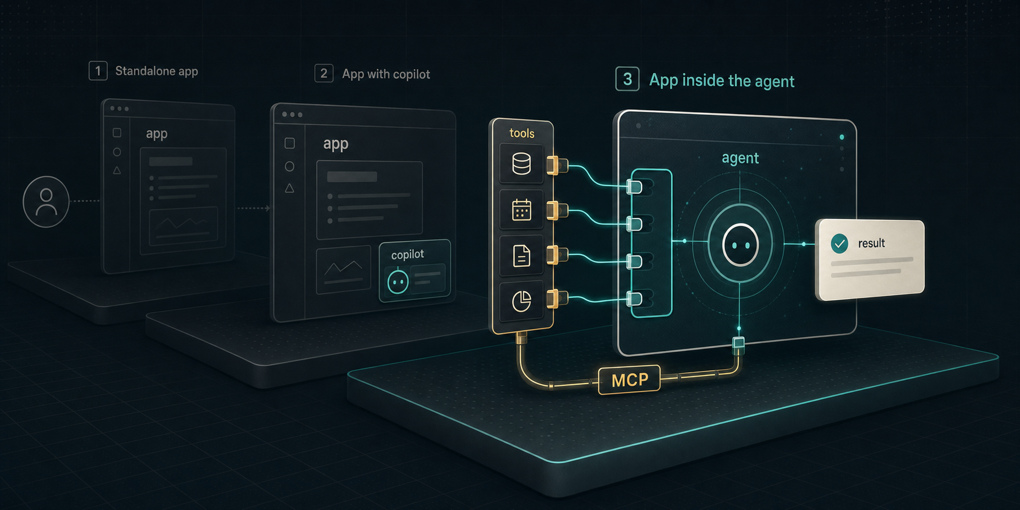
The way software meets intelligence has gone through two phases, and I think we’re at the start of a third. They’re not mutually exclusive — each one layers on top of the previous — but the center of gravity moves.
Paradigm one: apps for users. The traditional model. You build an interface, the user comes to it, learns it, and operates it. Every product is its own destination with its own onboarding, its own navigation, its own mental model to acquire. This isn’t going anywhere — but it’s no longer the only front door.
Paradigm two: agents inside apps. The wave we’ve been riding for the last couple of years. You embed an AI into your product: a chatbot, a copilot, an assistant with tools that act on your application. Done well, it’s genuinely powerful — I’ve written about conversational interfaces that render their own widgets, and I build these systems for clients. But notice the direction: the agent is brought into your app. The user still has to come to you.
Paradigm three: apps inside agents. The inversion. Instead of embedding an agent in your tool, you embed your tool in the agent — the one your user already talks to every day. You expose your application’s capabilities so that Claude, ChatGPT, or a company’s custom agent can call them. The user doesn’t adopt a new interface, because they already adopted one: their AI.
Why the inversion matters
The user already has an AI. They don’t want another app. Every new application carries an acquisition cost: install it, create an account, learn where things are, remember it exists next Tuesday. A tool added to an assistant someone already uses daily carries almost none of that. The assistant is the home screen now, and connecting to it is distribution.
Onboarding collapses to a description. In paradigm one you design empty states, tooltips, and tutorials so a human can learn your interface. In paradigm three the “user” reading your interface is a model, and it reads your tool descriptions in milliseconds. Nobody has to learn anything.
Capabilities compose; screens don’t. Once your app is a set of tools inside an agent, it combines with everything else the agent can reach. “Turn this contract into a calendar of every deadline it mentions” crosses a document tool with a calendar — a feature neither product built, assembled on the fly by the agent. Your app stops being a destination and becomes a capability, and capabilities multiply each other.
MCP is the standard, not the point
The obvious way to do this today is the Model Context Protocol: one server, and your tools work in Claude, ChatGPT, and a growing list of agent runtimes. I’ve built MCP servers before, and it’s the closest thing we have to a universal socket for this.
But the paradigm doesn’t depend on MCP. Protocols will evolve, and this type of connection won’t necessarily stay tied to one spec. The durable shift is the design decision underneath: your application has an agent-facing interface as a first-class surface, the way “API-first” made the programmatic interface a first-class surface fifteen years ago. Agent-first is API-first with a new consumer — one that reads documentation natively and composes tools on its own.
Not just consumers: agents in production
It’s tempting to read this as a consumer story — personal assistants, chat apps. It’s bigger on the enterprise side.
Companies are putting agents into production systems: pipelines that research, classify, reconcile, and execute processes end to end. Those agents need information and actions, exactly like a human employee needs a screen. If you build an automation for a client and it only has a web UI, it serves their people. If it also exposes tools, it serves their agents — whether that’s Claude or ChatGPT in their employees’ hands, or custom agents running inside their production workflows.
That second integration is where the compounding value is. Software that agents can consume gets woven into processes; software that only humans can consume waits for someone to open a tab.
A concrete example: VitaminD Explorer’s MCP
VitaminD Explorer is my app for answering one question well: when can your body actually synthesize vitamin D, and how long do you need outside? I’ve told the story of how it went from a Claude artifact to a production PWA. It has charts, a world map, push notifications — a full paradigm-one interface.
Recently I gave it a paradigm-three interface: an MCP server (connection guide). The public endpoint needs no account and exposes the core calculations:
search_city— resolve a city to coordinatesget_sun_times— sunrise, sunset, solar noonget_current_status— is right now a good moment, using live UV and cloud dataget_vitamin_d_window— the synthesis window for a specific day and personal profileget_vitamin_d_year— the whole year’s pattern: months, seasons, “when does the window disappear at my latitude”
With that connected, the interaction from the top of this article just works. I ask my assistant about today in London and it calls the tools and answers: window from 10:00 to 17:00, best hour 13:00, about 8 minutes of sun for 1000 IU with a peak clear-sky UV index of 6.8. No app opened, no tab switched. (Every number in that sentence came from a real tool call while writing this.)
A second endpoint sits behind OAuth. Link your account and the agent can also read your saved profile, your cities and your sun-day history — and write to it: “I was out for 20 minutes today” logs a session. Before any of that, a consent screen spells out exactly what the agent may read and write, and you can revoke it from your AI client at any time. In an agent-mediated world that consent screen is the permissions UI — the one surface where the person still sees, in plain language, what their assistant is about to do on their behalf.
The PWA isn’t obsolete — a 47,000-cell latitude heatmap is a job for a real UI, not for prose. That’s the point about paradigms stacking: the visual, exploratory experience stays in the app; the daily question goes to the agent.
Designing for a reader that isn’t human
Building the MCP server made something concrete for me: tool descriptions are the new UX writing. The model decides what to call, when, and with which parameters based entirely on the text you attach to each tool. That text is your interface.
Two examples from my own tools:
get_vitamin_d_window’s description explicitly says: “Only for single-day questions — for months, seasons or ‘when during the year’, callget_vitamin_d_yearinstead of calling this once per date.” That’s a guardrail against an agent looping 365 calls — the equivalent of disabling a button that would let a user hurt themselves.- Every response embeds “Clear-sky model estimate for healthy adults; not medical advice” in the payload itself, because in an agent-mediated world your disclaimer has to travel inside the data — you don’t control the screen it ends up on.
Parameter docs, sensible defaults, which tools to split and which to merge, what context to return so the next tool call is easier — this is interface design. The skills transfer from UX more directly than you’d expect; only the reader changed.
The question to ask your product
None of this says interfaces die or embedded copilots were a detour. All three paradigms will coexist, and plenty of experiences should stay visual and hand-crafted.
But there’s a new question every application has to answer, and it’s the one I’d start with today: if your user asked their AI instead of opening your app, could it answer with your product?
If the answer is no, someone else’s product will be in that response.
VitaminD Explorer is free and open source (GitHub); its MCP server is in active development — connect your AI to it here. Related reading: When the Chat Builds Its Own Interface and Software Is Dissolving Into the Model.