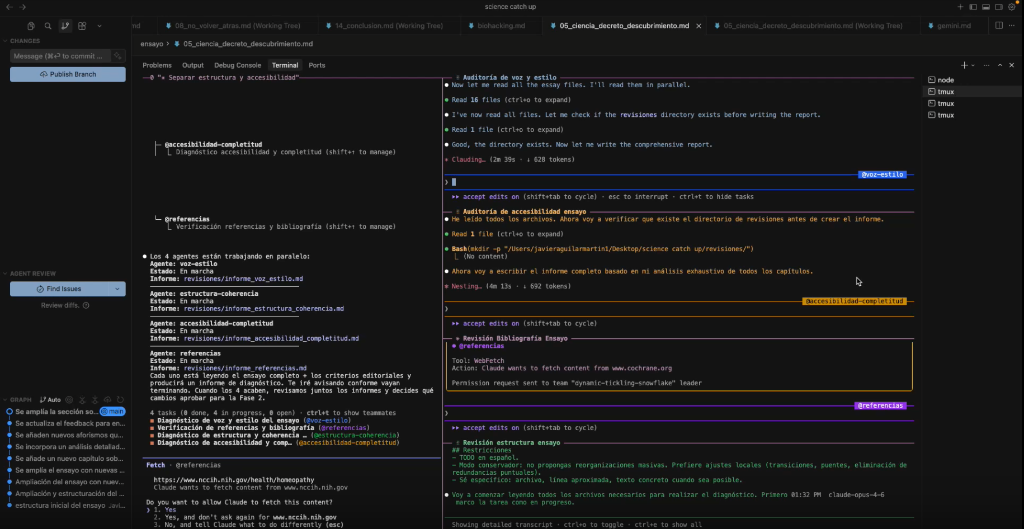
I recently started exploring Agent Teams, a new feature in Claude Code that allows you to coordinate multiple agents working in parallel. It’s a game-changer for tasks that require distinct roles or competing hypotheses.
In this post, I’ll walk you through my setup using tmux on macOS to manage a team of agents reviewing an essay.
See it in Action
I recorded a quick demo showing how the agents interact and report back.
The Use Case: Multi-Perspective Essay Review
I had an essay that needed a comprehensive review. Instead of asking one agent to “review everything” (which often leads to generic feedback), I wanted to assign specific roles:
- Style & Tone: Checking for voice consistency.
- Structure: Ensuring logical flow.
- Content: Verifying arguments and references.
This is where Agent Teams shines. You can spawn multiple “teammates,” each with a specific prompt and context, all coordinated by a “lead” agent.
The Setup: Claude Code + tmux
While Claude Code works great in a standard terminal, it really comes alive inside tmux, especially for Agent Teams.
- Start a tmux session: This allows you to split panes and manage multiple terminal instances easily.
tmux new -s agents - Launch Claude Code:
claude - Initialize the Team: I started by brainstorming with Claude about the best way to structure the team. Once we agreed on the roles, I simply told it to “start the team.”
How Agent Teams Work
When you initialize a team, Claude (the “lead”) spawns separate sessions for each teammate. In tmux, this visualization is fantastic because you can see them spinning up in parallel panes (though note: on some systems, auto-pane management might be tricky, so you might need to manually switch or resize).
Coordination & Permissions
The “Lead” agent acts as the coordinator. It assigns tasks to the teammates and they report back.
- Parallel Execution: All agents work at the same time. While the “Style” agent is reading the intro, the “Structure” agent is analyzing the conclusion.
- Inter-Agent Communication: They can talk to each other! If the Content agent finds a missing reference that affects the argument, it can flag it for the Structure agent.
- Permissions: You might need to approve tools permissions (like file writes) for each agent initially, but once they’re running, they are quite autonomous.
Results & Reporting
In my workflow, I asked each agent to write a report on their specific domain.
- They updated their status in real-time.
- Once finished, they “reported back” to the main session.
- The Lead agent then compiled their findings into a final summary.
When to use Agent Teams?
This workflow isn’t for everything. If your task is strictly sequential (Step B needs Step A to be 100% done), a single agent might be better.
Agent Teams are best for:
- Parallelizable Work: Code reviews, multi-file refactors, or comprehensive content audits.
- Interdependency: Where agents might need to correct or inform each other (e.g., “I fixed the API, please update the frontend”).
- Role-Based Tasks: When you need distinct “experts” (e.g., a “Security Expert” and a “Performance Expert” reviewing the same PR).
The New Bottleneck: You
As I scaled this up, I realized something interesting: when you have 4-5 agents working in parallel at superhuman speeds, the bottleneck shifts from “doing the work” to “reviewing the work.”
You become the manager. Your job isn’t to write code or draft essays anymore; it’s to define the scope, unblock your agents, and quality-check their output. It requires a different mindset—less “maker”, more “conductor”.
Final Thoughts
The combination of tmux and Claude Code’s Agent Teams creates a powerful “command center” feel. It transforms the AI from a chatbot into a coordinated workforce.
If you’re on macOS or Linux, give it a shot. It’s a glimpse into the future of agentic workflows.