There’s a moment, the first time this works, that is genuinely one of the better feelings available in a professional life. You described something that didn’t exist, and a few minutes later it existed, on your screen, doing what you said. If you never learned to write software, that moment lands even harder — you have just done a thing you had filed under not for me.
I don’t want to spoil it. It is as real as it feels, and the people telling you it isn’t are mostly protecting something.
But there’s a gap between that moment and having something other people can use, and almost nothing you did to get here helps you cross it. I wrote the full map of that gap — thirteen categories, three levels each. This piece is the other half of the question, the one people actually ask me: not what’s on the list, but what to do first.
The single most useful thing to understand on day one
You are not having a conversation. You are running a loop.
Specify → build → check → correct, then again. Anyone who came from a technical job has this in their bones and stops noticing it. If you didn’t, it is genuinely new information, and its absence is the biggest difference I’ve seen between people who end up with something real and people who end up with a very long chat history.
The default without it isn’t dramatic. You ask, you get something, you look at it for two seconds, you ask for the next thing. Nothing ever checks anything. It feels like progress the entire time, right up until you try to show it to someone and discover which parts were never true.
The fix is unglamorous and takes about ten seconds per cycle: after each thing you ask for, use it before asking for the next one. Not read it — use it. That’s the whole discipline, and it is worth more than any technical fact in this article.
The terminal, and why it’s less of a wall than it used to be
Almost everyone I’ve watched start from zero hits the same wall in the first hour, and it isn’t a concept. It’s a black window with text in it.
Worth being explicit about why you meet it at all: the terminal is the front door. The serious agents — Claude Code, Codex — are programs you start from there. You open the window, you type their name, and from that point you’re talking to the agent in plain language. The window isn’t the work. It’s the doorway to it.
The fear is rational. A terminal doesn’t explain itself, doesn’t confirm anything, and has historically punished typos in ways nothing else on your computer does. Every other piece of software you’ve used spent twenty years learning to be forgiving. This one didn’t.
Here’s what changed: past that doorway, you’re not the one who has to know the commands. The agent runs them. What’s left for you is much smaller — occasionally it hands you a line and asks you to run it yourself, usually because it needs a permission it doesn’t have. Your job is to paste it and press enter without freezing.
That’s the level required. Not memorising anything: not seizing up when a command appears.
And you can skip the doorway entirely. Both Claude Code and Codex ship desktop apps that look like an app, with browser versions too. Starting there is a completely reasonable decision and I’d suggest it to anyone who’s bounced off the terminal before.
One difference that isn’t obvious and causes real confusion: the browser versions don’t run on your computer. They run on someone else’s, which means they can’t see your files, don’t have your keys, and don’t have whatever you’ve installed. The desktop app and the terminal both work on your actual machine; the browser one works on a copy of your project, somewhere else. Early on this rarely matters. The moment your project depends on something that lives on your laptop, it matters a lot — and “it worked on my machine but not in the browser version” isn’t the agent being inconsistent, it’s two different environments with two different sets of configuration.
Cursor is worth a mention too. It started as a code editor, which sounds like the least friendly option on this list, but its recent versions are more chat than editor and it ends up being one of the gentler ways in — especially if seeing the files alongside the conversation makes you feel more oriented rather than less.
There’s also Claude Cowork, which is worth knowing about precisely because it was built for people who don’t code — you point it at a folder, describe what you want, and it works through the steps on your own machine. Its home ground is knowledge work rather than building an app: sorting files, pulling numbers out of a pile of documents, producing a report. If what you want is a working product, Claude Code or Codex is the tool. But Cowork is the clearest demonstration that “agent” and “terminal” were never the same thing, and it’s a gentle way to get the feel of directing one.
If you do start somewhere other than the terminal, two reasons to keep it as a starting point rather than a permanent home. The terminal is where the full set of capabilities lives — the apps trail on newer features, so sooner or later you’ll want something yours hasn’t got. And when things go wrong, it shows you the entire exchange between the agent and your machine, which is exactly what you want when you’re trying to work out what happened.
So: start wherever you’ll actually start. Just know you’re choosing the gentler door and not a different building.
One more habit worth building early: read what it prints, roughly. Not to understand it — to notice whether it ended in something that looks like a complaint. “Did that go well or badly” is a question you can answer from the shape of the output long before you can read a word of it.
You’ll ask for less than you could, and you won’t know it
The ceiling on everything you build is not your skill. It’s your idea of what’s askable.
If you think these tools write snippets, you’ll ask for snippets. If you think they can’t touch payments, or email, or a database, you won’t ask, and nothing will correct you, because an agent answers what you ask and never mentions what you didn’t. This is the quietest failure in the whole thing: there’s no error message for a question you never asked.
There is one move that fixes this and it costs nothing. Ask the agent what it can do for your specific case. Not in general — describe your actual project and ask what approaches exist, what it would need, what it can’t do, and what you’d be signing up for. It answers this well, and almost nobody asks.
Do it before you start building, and again whenever you find yourself assuming something isn’t possible.
What to learn first, and why in this order
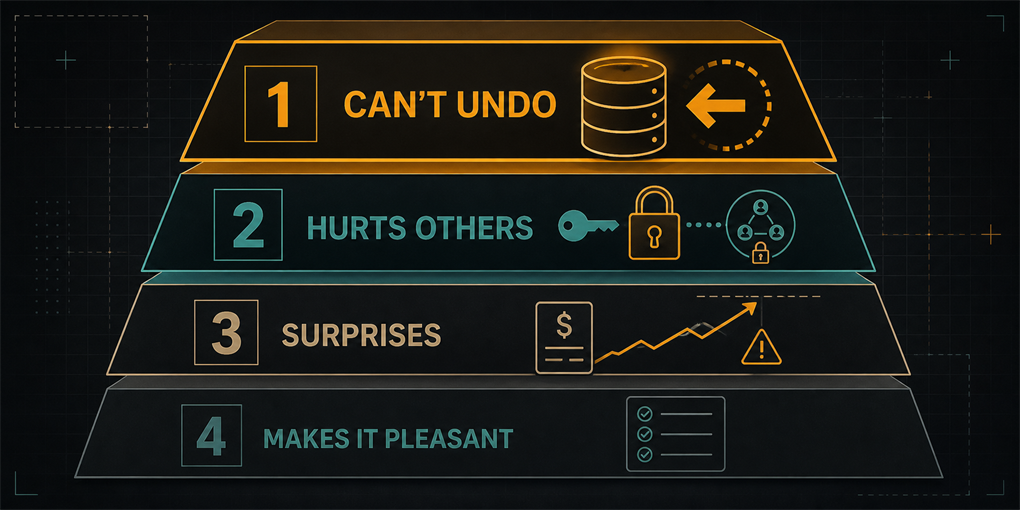
The map has thirteen categories. You do not need thirteen on day one, and someone handing you all of them at once is why most people bounce off. The order matters more than the list, and it comes from one question: when this goes wrong, who pays?
First, the things you can’t undo. Your data isn’t your code. If you delete the project and rebuild it, the code comes back — everything people typed into it doesn’t. And there’s a way to recover yesterday’s version of your work that is not Ctrl+Z.
Which leads to the one I see skipped most often: backups. Not because the idea is foreign — you already keep copies of documents that matter to you, and you’ve felt the specific dread of a file you didn’t back up. You just haven’t applied it here, because a database doesn’t look like a folder and nothing ever prompted you. So ask the plain version of the question: if this database vanished tonight, where’s the copy, and when was it last made? If the answer is a shrug, that’s the afternoon’s work, and it’s worth more than everything else on this list combined.
That group is the difference between a bad day and a lost month.
Second, the things that hurt other people. The moment you have real users, the cost of getting something wrong stops being yours. Keys don’t belong in the code. A login screen protects the screen, not the data behind it. If you store anything about other people, you’ve taken on obligations you didn’t sign for. This is the group I’d never let someone skip, because it’s the one where the person paying never agreed to your learning curve.
Third, the things that surprise you. Your bill has no ceiling unless you set one. Your app works with you and might not with three hundred people. Something you depend on can disappear.
Last, the things that make it pleasant. Tests, documentation, your own taste in how it looks. Real, and none of them are why anyone’s project ends badly in month one.
Four groups. Two afternoons for the first two. That is a completely different proposition from “learn to code”, and it’s the honest version of what this requires.
The mistake this whole article is about
Everyone starting from zero makes the same one, and it isn’t the one they’re afraid of.
The fear is of breaking something through ignorance. The actual mistake is handing over decisions you have no way to check — and, worse, not knowing they were decisions. The agent picked a way to store your data. It picked what’s public and what isn’t. It picked what happens when something fails. Each of those looked, from your side, like nothing happening at all.
That’s what makes it hard to notice: delegating well and delegating blindly look identical from the outside. Both are you describing what you want and receiving something that works. The difference only shows up later, and only if you’re unlucky.
You don’t fix it by delegating less — you’d be slower and no safer, since you can’t check what you don’t know about. You fix it by knowing which boxes exist, so you can see which ones are empty. An empty box you know about is a managed risk. An empty box you don’t know exists is the thing that ends up in the news.
That’s the entire reason for the map, and why the first thing to learn isn’t a skill.
If you came from WordPress, no-code, or automations
Then you’re not starting from zero, whatever you’ve been telling yourself.
You already know a site can be live or not live. You’ve hit a plugin that broke everything and had to get back. You’ve had a subscription you forgot about. You know some things live in the tool and some things live in your account. Those are the same categories, learned in a different shape.
What tends to be missing is narrower: the loop as a discipline, and the fact that this time nobody is protecting you. Those platforms had walls — you couldn’t delete the database because you couldn’t reach the database. Now you can reach everything, which is exactly why it’s more powerful and exactly why the map matters.
In my experience this profile adapts fastest of all. Not because they know more, but because they already believe software is something you can go and change, and that belief is most of the battle.
Where to start today
If you want to know which boxes are empty for you, there’s a thirteen-question version of the map — about two minutes, and the useful outcome is finding a category you’d never considered.
And the honest summary of everything above:
- Use the thing after every change. Not read it, use it. This one habit is worth more than any fact here.
- Ask what’s possible before you assume it isn’t. The ceiling is your idea of what’s askable, and the agent will happily raise it if asked.
- Spend one afternoon on what can’t be undone — backups included — and one on what hurts other people. Skip the rest for now.
- Assume you’ve handed over decisions you didn’t notice. You have. The question is only which ones.
None of this is learning to program. It’s learning what to keep an eye on while something else does the programming — which is a smaller job, and nobody teaches it because it falls between the cracks: too obvious for engineers, invisible to everyone else.
Second of three pieces on what building software with agents actually requires. The first is the map itself; the last one goes the other way, for people with an engineering background who delegate too little rather than too much. If you’d rather go through your own project with someone, that’s what I do.