The Interface Moved Up
In this article
- Five years in one picture
- The editor: the human writes, the model suggests
- The terminal: the agent needs the whole machine
- The cloud: the laptop has a ceiling
- The app: the same work, but you can see it
- What moved up
- The surface separates from the harness
- Managing, not typing
- Agents that run behind
- And reading the code?
- What comes next
I started working with AI inside the editor, like almost everyone. Then I moved to the terminal, with a light editor open next to it. Today, on my own machine, I still spend most of my time in the terminal: habit, a lighter footprint, and being right next to the shell. But I use the app more every month: on the desktop, and on my phone when I’m away from it. It handles several projects and conversations better, and it lets me mix an ordinary chat, a coding session running in the cloud and a coding session running on my laptop in the same sidebar.
That drift isn’t only mine. Cursor, OpenAI, Anthropic and GitHub have spent 2026 shipping the same kind of product: a window for managing agents rather than editing files. Laid side by side, the moves have a pattern. Each jump raised what the human looks at. First the code, then the diff, then the result. The next jump is already visible, and in it the human doesn’t even start the work.
Five years in one picture
Two things jump out. The first is that no surface disappeared. The editor is still there, the terminal is still there, and the new surfaces were added on top. What changed is where you spend most of the day. The second is the density: almost everything that matters happened in the last twenty months.
The editor: the human writes, the model suggests
GitHub Copilot opened its technical preview in June 2021 and reached general availability a year later. The unit of work was a line or a function: you were typing, and the model completed. In 2023 came chat inside the editor (Copilot X in March, Copilot Chat GA in December), and at the end of 2024 Cursor added an agent to its Composer that picked its own context and used the terminal.
The agent was already doing multi-step work, but the frame was still the file. The human was looking at code, because the code was where the work happened.
The terminal: the agent needs the whole machine
Agents in the terminal did not start in 2025. Aider and gpt-engineer were already there in the middle of 2023. What changed in 2025 is that the terminal became the main road: Claude Code launched in February as a research preview, Codex CLI in April, and Claude Code reached general availability in May.
The terminal won because of what it gives the agent, not because of what it gives the person. The shell is a universal interface to tools: tests, git, package managers, every CLI you have, and any script. Handing the agent a terminal is the cheapest way to hand it everything. And that goes together with the models’ growing autonomy: an agent that can run fifty commands on its own needs the whole machine, not a completion box.
It helps to split the terminal stage into two ways of working:
- Terminal plus editor. The terminal gives the orders, and the editor stays open to read the diff and handle git. You still look at code, but as a reviewer rather than an author.
- Terminal alone. More weight goes to managing agents, and terminal commands become the only manual touchpoint in development. You may still open an artefact, a browser to see the final result, or an extension, but the development itself happens in the conversation. It is less transparent: you see what the agent tells you, unless you ask for more.
In both, the human looks at the diff, and the unit of work is a task.
The cloud: the laptop has a ceiling
Cloud agents arrived before the apps that manage them today. Three launched within five days of May 2025: Cursor’s Background Agents, Codex inside ChatGPT and the Copilot coding agent, which takes a GitHub issue and opens a pull request. Claude Code on the web followed in October.
Convenience is only part of the reason. The other part is capacity. Running several agents at once, each with its own branch and test suite, saturates a normal laptop long before it saturates your attention. Parallel agents with worktrees work, until the machine becomes the bottleneck.
The cloud has its own price: the environment has to be reproducible. If you want the remote agent to run exactly what runs locally, the repository needs to own its bootstrap: system packages, test databases, secrets. It isn’t always worth it. Sometimes the task doesn’t need the full environment, and sometimes it is desirable to keep one phase local, such as the one that touches data you’d rather not move, or the final check on your own machine. Anthropic’s Remote Control takes that position explicitly: the session keeps running on your computer, and you drive it from your phone.
The app: the same work, but you can see it
Here is where 2026 happened. Claude Code arrived in the Claude desktop app with Opus 4.5 in November 2025, already with parallel local and remote sessions. Then, in quick succession: the Codex app in February, Cursor 3 in April with a window for managing agents across local, worktrees, cloud and SSH, the Claude Code desktop redesign that same month, and the Copilot app in June.
The last one says the most. The company that invented the assistant inside the editor now ships a standalone app for running agents. And Cursor 3 did not delete the IDE: the agent window lives beside it, and you can switch. The editor wasn’t replaced, it stopped being the centre.
Seen from inside, what the app offers is less dramatic than it sounds, and that’s precisely its value:
- A normal chat, but for code. The conversation looks like ChatGPT or Claude, the interface everyone already knows, and underneath it runs an agent with access to your repository.
- Everything around the conversation within reach. Diff, git, pull requests, artefacts, a preview panel and an embedded browser to see the result. No window switching.
- The same things you do in the terminal, but clearer. A lot of the improvement is simply that it is easier to read: sessions in a sidebar, diffs with a real viewer, panels you arrange.
- Several devices. You start something at the desk and follow it from your phone. With cloud sessions this isn’t a trick; the work was never on your laptop.
And one change that’s easy to miss: in the same sidebar live ordinary conversations, remote coding sessions and local ones. The app stops being a place to program and becomes the place where you work.
The cost is weight. It uses more resources than a terminal, which is part of why the terminal is still my default on my own machine.
What moved up
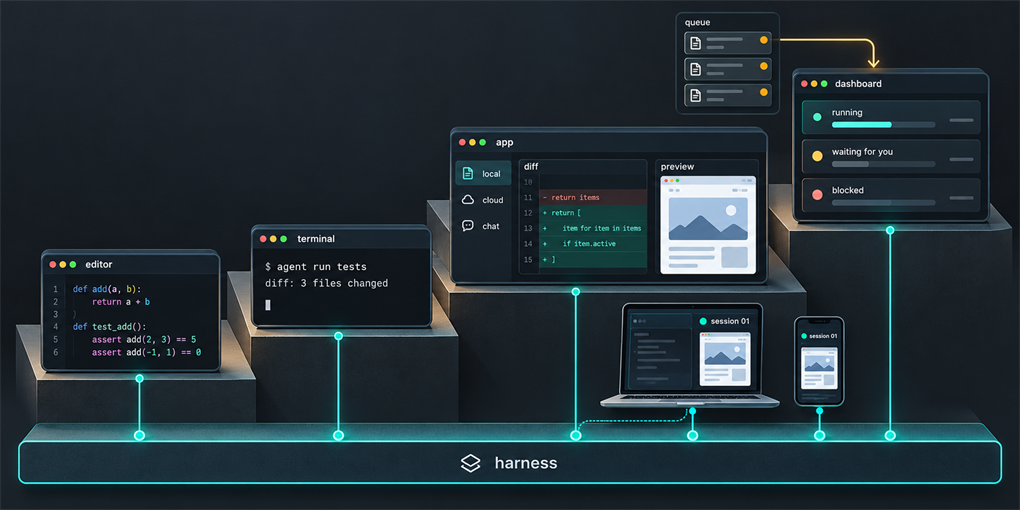
Put the stages together and the thesis appears. It isn’t that the interfaces got prettier. It’s that what the human needs to see went up one level each time.
The surface separates from the harness
The most important consequence is not on screen. The same agent now runs in the terminal, in the IDE, in the desktop app, in the browser, from the phone, from a ticket in Linear or Jira, or on a schedule. What makes it that agent lives underneath and is shared by all those surfaces: the harness.
Two trends push in the same direction. Open-source models are increasingly competent and frontier models increasingly cheap, so choosing a model is becoming a routing decision rather than a platform decision. And the work is starting to happen at scale: many sessions, many repositories, long tasks. At that point what distinguishes one team’s agents from another’s is not the model and not the window, but the harness.
Managing, not typing
When the human stops watching each step, the questions change. They are no longer “how do I write this” but “what may this agent do, what does it get, what does it give back, and when does it stop to ask me”. They matter most in long-horizon work, where an agent runs for hours and a bad decision early on gets multiplied:
- Permissions. What it may touch without asking, what it may never touch, and in which environment. Deploying, writing to a shared database or sending anything outside is a different category from editing a file.
- Inputs. Which context it starts with: the ticket, the specification, the repository’s instructions, the memory of previous sessions. An agent that starts without the facts that change its judgement makes decisions that someone who knows them wouldn’t.
- Outputs. What counts as done and in what form it comes back: a pull request with evidence, a report with sources, tests that fail before and pass after. The output format is what lets you, or the next agent, check without reopening everything.
- Escalation. When it stops and asks, and to whom. An agent that never escalates makes decisions it shouldn’t; one that always escalates gives the work back to you.
And the output doesn’t always go to a person. More and more, one agent’s output is another agent’s input: a plan that an implementer executes, a report that a reviewer checks, a pull request that a tester picks up. That turns the output format into a contract between agents. It also adds something to manage that a single session never had: the communication between them. What one agent tells another, whether it is true, and who notices when it isn’t. When I read the messages between parallel sessions, the channel was mostly used to tell the other session something true about its own work, and in the experiment one session caught another shipping a release that did not exist. That traffic is part of what whoever manages the agents needs to see.
For the surface, that translates into a short list. The screen for managing agents needs to show the state of each one, what it’s waiting for from you, what’s blocked and why, what the agents are passing to each other, and the evidence of each result, one click away. Everything else is decoration. It’s also the list that fixes how many agents one person can really supervise, which is a human limit, not a technical one.
Agents that run behind
The last step is the one where the human doesn’t start the work. The chain looks like this: a customer leaves feedback, a ticket is created, an agent develops it, and the human supervises the performance of that process through evals (automated too), external feedback and final testing. Nobody opens a session.
It sounds like speculation, but the pieces already exist. Linear turned agents into workspace members in May 2025, and three months later its Cursor integration allowed triage rules that assign issues to the agent automatically. Copilot picks up Jira issues and Cursor does too. Anthropic’s Routines run a saved agent in the cloud on a schedule, when called through an API or on a GitHub event, without a laptop switched on. The Copilot app ships its own scheduled automations. Most of it is still in preview, but it’s already launched.
In that world, the interface for this kind of work is no longer a window where you type. It’s a dashboard of metrics and a queue of what needs your judgement. The result arrives where you already are, which is the same movement I described in Bring Your App to the Agent, seen from the developer’s side.
And reading the code?
There are cases where you want to be close to the code: a delicate change, a piece you don’t trust, an exploration where you don’t yet know what you’re looking for. That doesn’t go away, but it’s becoming the edge case, as long as the evidence can be extracted. You can ask the agent for the exact fragment it changed, open it in the repository, request the test that proves it. What matters is verifying the result, not re-reading the path, and a good surface puts that evidence one click away.
What comes next
The terminal isn’t dying. It is becoming the substrate: the place where the agent executes, and a surface among others for whoever prefers it. The editor isn’t dying either. It’s what you open to look closely at code, and it remains one way of working on the non-code files that agents produce, such as reports and write-ups, although there it is one option among others: an artefact, a shared document, a drive. What’s happening is that the interface is decoupling from the agent. You’ll choose the surface by moment and by device, while the harness underneath stays the same.
What will set a team apart, then, is not which window it uses. It’s how well it has defined what its agents may do, what they receive, what they return and when they call a human. That’s a management problem, and it’s where the interface is heading: fewer keyboards and more dashboards.
Sources for the dates in the timeline: Copilot preview · Copilot GA · Copilot X · Copilot Chat GA · Cursor 0.43 · Cursor 2.0 · Aider releases · Claude Code preview · Codex CLI · Copilot CLI GA · Devin · Cursor Background Agents · Codex cloud · Copilot coding agent · Claude Code on the web · Claude Code in the desktop app · Codex app · Cursor 3 · Claude Code desktop redesign · Copilot app GA · Linear for Agents · Cursor in Linear · Copilot for Jira · Routines · Cursor in Jira.